HF
HODA FINANCE — FP&A TOOLKIT

Your entire month-end close.
One workbook.

Illustrative · $5M company sample · 9 months closed
Variance Summary — YTD
Revenue $3.85M +$105K FAV
Gross Profit $1.74M +$48K FAV
EBITDA $468K −$42K ADV
Net Income $281K −$39K ADV
Revenue PVM Bridge
Price
+$84K
Volume
+$26K
Interaction
−$5K
Three-way decomposition · auto-calculated
Rolling Forecast Status
J
F
M
A
M
J
J
A
S
O
N
D
9 months locked · 3 open
Closed months: actuals
Open months: best-estimate forecast
Workbook Specs
Tabs11
Formula cells1,800+
Commentary blocks8
Price$97

Most FP&A Teams Are Rebuilding the Same File Every Month

A different Excel file for each close cycle. Variance formulas copied from last month, manually adjusted. The PVM bridge is a simplified two-way split that misses the interaction effect. The rolling forecast is a column of paste-as-values. By the time the board deck is ready, the narrative is already outdated and the methodology is impossible to audit.

The problem is not the analyst. It is the tooling. A properly structured FP&A workbook should require one data entry point per close cycle — actuals go in, and the variance analysis, bridge, forecast, and dashboard all update automatically. No manual overrides. No copy-paste. No rebuilding.

$97 One-time. Replace it with your own budget and actuals in under an hour. Use it every month-end, indefinitely.

What You Get Inside
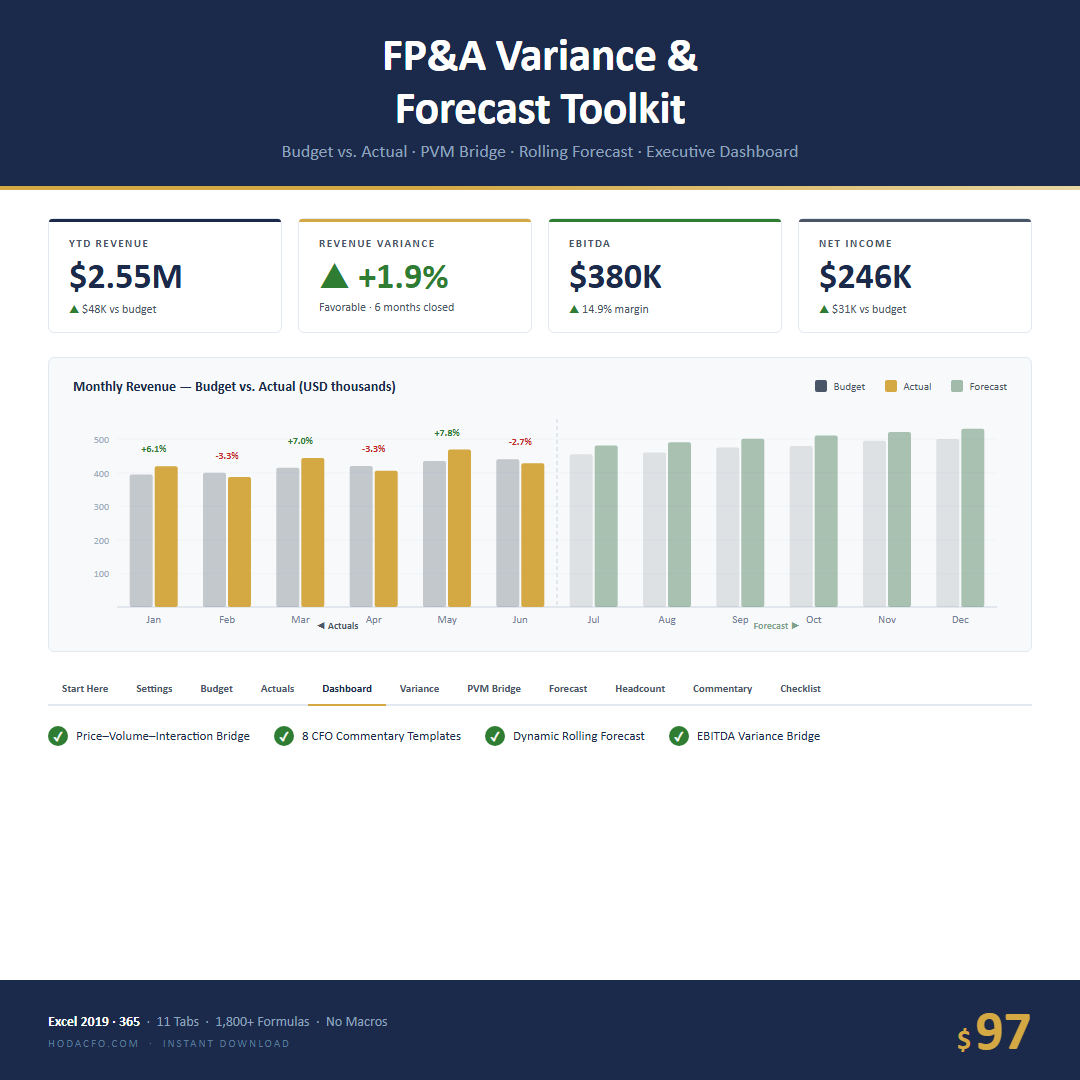
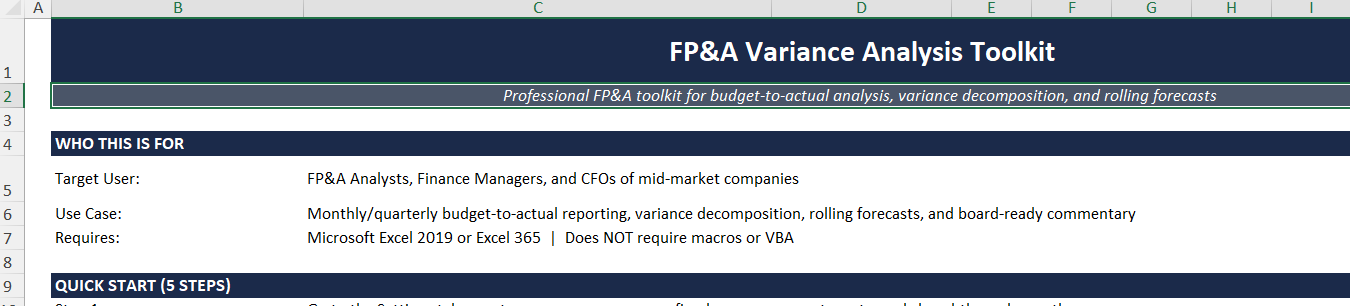
FP&A Variance & Forecast Toolkit — Excel workbook overview
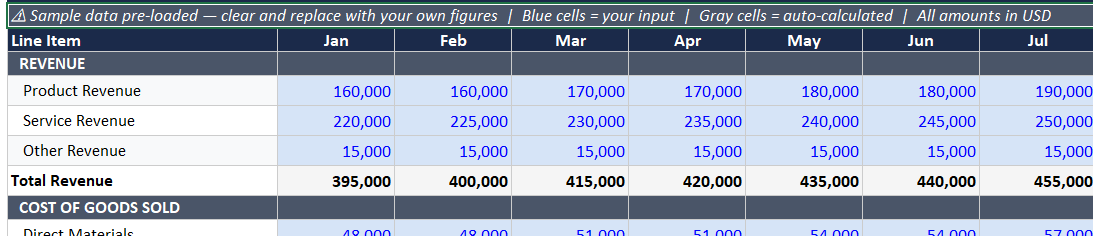
FP&A Variance & Forecast Toolkit — Variance Analysis tab showing budget vs actual for all 12 months with favorable/adverse color coding
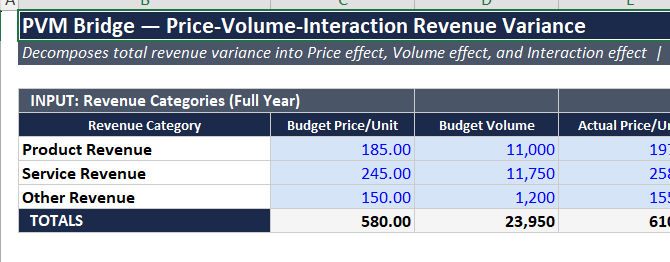
FP&A Variance & Forecast Toolkit — PVM Bridge tab showing Price, Volume, and Interaction decomposition
FP&A Variance & Forecast Toolkit — Rolling Forecast tab with auto-locked closed months and open forecast inputs
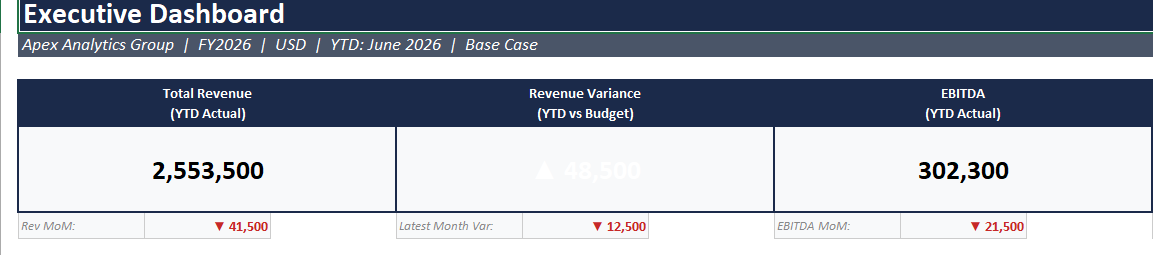
FP&A Variance & Forecast Toolkit — Executive Dashboard tab with revenue variance, EBITDA variance, and bar charts

Features

  • 12-Month Variance Analysis — Revenue, COGS, Gross Profit, OpEx, EBITDA, Net Income — all 12 months on one sheet. Every line vs. budget with favorable/adverse color coding, YTD column, and full-year summary. No manual calculations.
  • PVM Bridge (Price – Volume – Interaction) — The correct three-way decomposition. Enter budget and actual price/volume for each revenue line. The Price variance, Volume variance, and Interaction effect calculate automatically. Most templates use the simplified two-way split that misses the interaction term — this one does not.
  • Rolling Forecast with Auto-Lock — Set the closed-through month in Settings. Closed months lock to actuals automatically. Open months remain editable as your best-estimate forecast. No manual overrides, no copy-paste.
  • Headcount Plan — Budget vs. actual headcount by department with P&L reconciliation. Total loaded headcount cost ties directly to the Salaries & Wages budget line — so your people-cost explanation is always grounded in the budget.
  • Executive Dashboard — One-page summary: Revenue Var, EBITDA Var, Net Income Var, YTD closed months, 12-month budget vs. actual bar charts, and EBITDA variance bridge. Board-ready without additional formatting.
  • 8 Commentary Templates — Board-ready narrative blocks for favorable revenue variance, adverse margin variance, mixed quarter, reforecast rationale, headcount miss, revenue-down-costs-down, and two more. Copy, customize, send.
  • 21-Step Month-End Checklist — Every step in the close process, in order. Nothing gets missed. Works as a standalone tab or printed for your close binder.
  • Zero Macros — No VBA, no Power Query, no structured tables that break on row insert. Pure Excel formulas throughout. Open on any machine without enabling anything.
  • Sample Data Pre-Loaded — See every tab working before you enter a single number. Replace with your figures when ready.
  • Fully Documented Row Map — The Start Here tab explains every section, every input cell, and every formula driver. Add line items without breaking the model.

How It Works

1

Set Up Once

Enter company name, fiscal year, currency, and tax rate in Settings. Load your budget into Budget Input — one row per line item, one column per month.

2

Enter Actuals Each Month

Post the month’s actuals in Actuals Input. Update the closed-through month in Settings. The variance analysis, PVM bridge, rolling forecast, and dashboard all update automatically.

3

Present Without Rebuilding

Pull the Dashboard tab into your board deck. Use a Commentary Template for the narrative. Every number is sourced, every variance is explained, every month is consistent.

All 11 Tabs

Tab 01
Start Here
Setup guide, quick-start checklist, and documented row map for adding line items without breaking formulas.
Tab 02
Settings
Company name, fiscal year, currency, tax rate, closed-through month, and scenario selector. Change these once — everything else updates.
Tab 03
Budget Input
Monthly budget entry by P&L line item. Revenue through Net Income. Single entry point for the full year.
Tab 04
Actuals Input
Monthly actuals — same structure as Budget Input. One entry point per close cycle. No formula editing required.
Tab 05
Variance Analysis
Budget vs. actual for every P&L line, all 12 months, with YTD and full-year columns. Favorable/adverse color coding throughout. Auto-calculates.
Tab 06
PVM Bridge
Automatic Price – Volume – Interaction decomposition. Enter budget and actual price/volume per revenue line. Three-way split auto-calculates.
Tab 07
Rolling Forecast
Best-estimate forward view. Closed months lock automatically. Forecast months remain editable. One flag cell per month controls locking.
Tab 08
Headcount Plan
Budget vs. actual HC by department. P&L reconciliation ties total headcount cost to the Salaries & Wages budget line.
Tab 09
Dashboard
One-page executive summary: Revenue Var, EBITDA Var, Net Income Var, YTD closed months, bar charts, and EBITDA variance bridge.
Tab 10
Commentary Templates
8 board-ready narrative blocks for favorable, adverse, mixed, reforecast, headcount, and scenario variance situations. Copy and customize.
Tab 11
Month-End Checklist
21-step close process in order. Works as a standalone reference or a printed close binder. Nothing gets missed.

By the Numbers

Tabs
11
Months covered
12
Commentary blocks
8
Close steps
21

Who This Is For

IS FOR

  • Financial Controllers who own the full close cycle and present to a board or leadership team every month
  • FP&A Analysts who are tired of rebuilding the same variance report from scratch each close cycle
  • Finance Managers at $5M–$500M companies who need clean, consistent variance reporting without hiring a full FP&A team
  • CFOs who want a defensible, board-ready report that a new analyst can maintain without retraining

IS NOT FOR

  • Excel beginners who have never navigated a multi-tab financial model
  • Anyone looking for a one-click automated output that requires no setup or inputs
  • Teams that need real-time ERP integration — this is a manual-entry Excel workbook

Built by a Practitioner

Hoda Elmorshidy — Financial Controller and Fractional CFO

Hoda Elmorshidy

Financial Controller | Fractional CFO | FP&A | 9+ Years Corporate Finance

Financial Controller and Fractional CFO with 9+ years leading finance functions across commodity trading, real estate, hospitality, and professional services. Currently running full-cycle month-end close on a 5-day cycle (30% faster than the prior process) while serving 5+ SME clients as Fractional CFO with a sub-7-day close target across the portfolio.

The FP&A Toolkit started as the actual workbook used to run month-end close for a multi-entity client portfolio. The variance structure, PVM methodology, rolling forecast logic, and headcount reconciliation are not teaching aids — they are the working tools of a live engagement. Every formula exists because a real close cycle demanded it.

Connect on LinkedIn →

One Workbook. Every Month-End.

Set it up once. Enter actuals each close. Present without rebuilding.

$97

An FP&A consultant to build this: $3,000–$8,000. This workbook: $97.

Instant Excel download Excel 2019 · 2021 · 365 Mac & Windows No macros No subscription
Get the FP&A Toolkit — $97

Instant delivery via Gumroad. One .xlsx file — no macros, no add-ins required.

← Back to all tools

Common Questions

Does this work in Google Sheets?

The formulas are 100% Excel-native. Most standard formulas will work in Sheets, but the layout, conditional formatting, and color-coded variance indicators are optimized for Excel. If you work primarily in Sheets, the core logic will transfer but you may need to adjust formatting.

Do I need macros or VBA to use this?

No — zero macros, zero VBA, zero add-ins. Everything runs on standard Excel formulas. You can open it on any machine without enabling anything.

Can I add more departments or P&L line items?

Yes — the Start Here tab documents the row structure for every section. The model uses direct cell references, so adding a line within a section requires updating the corresponding references in the linked tabs (Variance Analysis, Rolling Forecast, Dashboard). The Start Here tab explains exactly which tabs need adjustment and in what order. The PVM Bridge has a separate input grid for revenue lines with its own documentation.

What year does it cover?

Any fiscal year — set it once in the Settings tab and all column headers, date references, and the month-lock logic update automatically.

How does the rolling forecast auto-lock work?

In the Settings tab, you set a “closed through” month. The Rolling Forecast tab reads this flag and treats all months up to and including that month as locked actuals. Forecast months remain open for editing. You update this one cell each month-end — no manual overrides or copy-paste required.

How is this different from a free FP&A template?

Free templates give you a static budget vs. actual table. They do not include a correct three-way PVM bridge (most use the simplified two-way Price-Volume split that misses the interaction effect), a rolling forecast with auto-lock, a headcount plan that reconciles to the Salaries & Wages budget line, or board-ready commentary templates. This workbook was built to solve real month-end close problems — not to demonstrate concepts.

Related Guides

Variance Analysis in Excel — Complete Guide Institutional-Grade DCF Model All Hoda Finance Tools