HF
HODA FINANCE

Your Etsy store health: 74/100

Risk → Watch → Healthy · True profit, fees, Kill/Keep/Scale & tax readiness in one score
74 Score
Risk Healthy
True Profit42%
Etsy Fees$2.8K
Kill/Keep12:8
Tax Reserve$1.5K

Most Etsy Sellers Don't Know If They're Profitable

Etsy's fee structure — listing, transaction, payment processing, offsite ads — takes 25–30% of every sale before you calculate COGS. Most sellers track revenue. Very few track what they actually keep after fees, materials, and taxes.

This tracker shows the number that matters: true profit. Not an estimate. Per listing, per market, over time.

$49 A pricing mistake on one listing costs more than this tracker. It pays for itself the first time you identify a listing that's losing money.

What You Get

  • Auto Fee Calculator — US, UK, AU, CA, and DE rates built in. Enter a sale, select your country, and every fee layer calculates automatically. Note: Fee rates are verified at launch; always verify current Etsy fees.
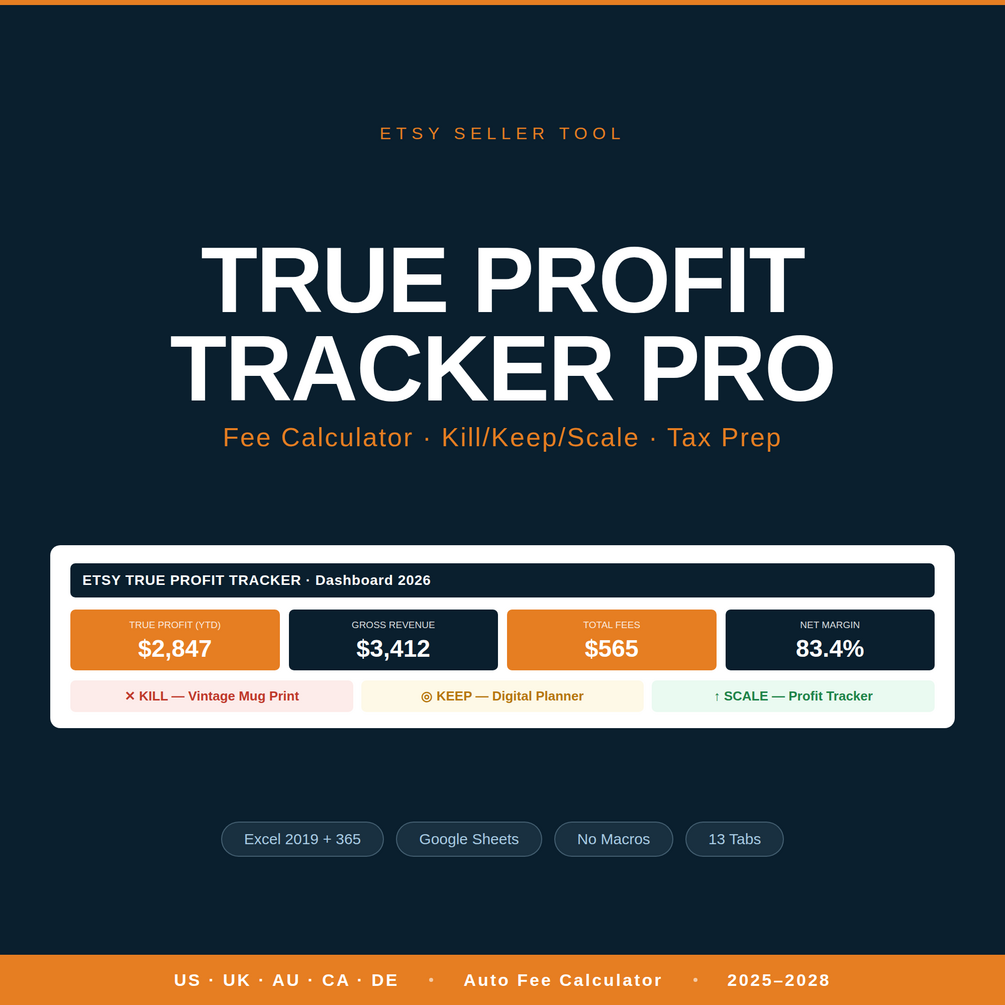
  • True Profit — Revenue minus every Etsy fee, minus COGS, minus expenses. The number left is yours.
  • Kill/Keep/Scale — Automatic verdict on every listing. Green = scale up. Yellow = keep monitoring. Red = kill the listing.
  • Pricing Simulator — See exact profit impact before changing a price. Test different price points and fee scenarios instantly.
  • 90-Day Revenue Forecast — Gap to target, break-even per new listing, projected revenue based on current trends.
  • Market Intel — Competitor price positioning tool. See where your listings sit in the market.
  • Tax Prep — Quarterly estimated payments calculated from your actual P&L. No surprises at tax time.
  • Dashboard — Year-at-a-glance KPIs covering 2025–2028. Revenue, profit, fees, and tax at a glance.
  • P&L — Monthly profit & loss, auto-calculated from your sales and expense data.
  • What You'll See Inside

    Etsy Profit Tracker cover showing the 13-tab Excel workbook with fee calculator, true profit, and Kill/Keep/Scale dashboard.

    How It Works

    1

    Enter Your Sales & Shop Settings

    Set your country once in Shop Settings. Log sales in the Sales tab — item name, price, COGS. Everything else calculates automatically.

    2

    Fees & Profit Calculated Instantly

    Listing fees, transaction fees, payment processing, offsite ads, COGS, and tax reserve — every layer deducted automatically. True profit displayed per listing and in aggregate.

    3

    Know What to Keep, What to Cut

    Kill/Keep/Scale flags tell you which listings to cut, which to keep, and which to scale. Use the Pricing Simulator before changing prices. Review the Dashboard daily.

    Who This Is For

    IS FOR

    • Etsy sellers with 10+ active listings
    • Sellers in US, UK, AU, CA, or DE markets
    • Sellers who want true profit numbers, not estimates
    • Sellers preparing for tax season

    IS NOT FOR

    • Sellers with only a few listings at hobby volume
    • Sellers who already use a full accounting system
    • Non-Etsy merchants (Amazon, eBay sellers — different fee structures)
    • Etsy sellers who also run a freelance agency — see the Freelance Agency Finance System ($49)

    Built by a Practitioner

    Hoda Elmorshidy

    Hoda Elmorshidy

    Fractional CFO | Financial Modeling | Quantitative Analysis | 9+ Years

    Financial Controller and Fractional CFO with 9+ years leading finance functions across commodity trading, real estate, hospitality, and professional services — organizations up to $13M+ revenue, 2,000+ monthly transactions, teams of accountants and stock controllers, with a background in quantitative trading and financial modeling. Currently running full-cycle close on a 5-day cycle while serving 5+ SME clients as Fractional CFO with a sub-7-day close target across the portfolio.

    Every tool in this portfolio started as a solution to a real engagement problem — a valuation that needed to survive board-level challenge, a tax obligation that needed to be calculated before filing season, a profit number that needed to reflect what actually clears after platform fees. Nothing here was built for content. Every formula, every methodology, every output structure exists because a real situation demanded it.

    Excel advanced with VBA. Python for financial data automation and quantitative analysis. Power BI, SAP Business One, Zoho One, QuickBooks, Xero. IFRS reporting across multi-industry operations.

    Connect on LinkedIn →

    Know Your True Profit. Every Sale.

    The tracker pays for itself the first time it catches a listing that's losing money after fees.

    $49

    A single pricing mistake costs more than this tracker. Know what you actually keep.

    Instant Excel download13 integrated tabsExcel 2019+ & Excel 365Google Sheets compatibleNo subscription

    Instant delivery via Gumroad. Excel file — no macros required.

    ← Back to all tools

    Common Questions

    Which Etsy markets are supported?

    US, UK, AU, CA, and DE. Fee rates for each market are built into the Auto Fee Calculator and verified May 2026. If your market isn't listed, the US rates provide a close approximation until we add your region.

    Does this replace my bookkeeping software?

    No. This is a profit tracking and decision-making tool that sits alongside QuickBooks, Xero, or whatever you use. It tells you which listings are profitable and which aren't — something general accounting software doesn't do for Etsy sellers specifically.

    How long does it take to set up?

    About 5 minutes. Set your country in Shop Settings, then start logging sales in the Sales tab. Everything else — fee calculations, profit, Kill/Keep/Scale verdicts, tax prep — calculates automatically.

    Does it work in Google Sheets?

    Yes. Download the .xlsx file and import it into Google Sheets. All formulas and conditional formatting are preserved. No macros required.

    Free: Etsy Fee Breakdown by Market

    Exactly how much Etsy takes from a $25, $50, and $100 sale — listing, transaction, payment processing, and offsite ads — for US, UK, AU, CA, and DE markets.

    No spam. Unsubscribe anytime. Built by a practitioner, not a content creator.